Who is on the other side
Continues with the customer identity supplied by the channel and the conversation history, helping reduce repeated questions.
Customer messages, sales follow-up and appointments. An assistant grounded in your business knowledge, with your team in control. Together in Molvek Bot.
A question becomes a conversation. A conversation becomes work your team can follow. Choose a step and explore the flow.
A reply grounded in your business knowledge.
Website chatThe need and context, together
Product demo
Demo Customer is looking for a product demo for a team of 8. They asked to meet on Thursday at 2 pm.
Welcome the first message with your business knowledge.
Your workspace
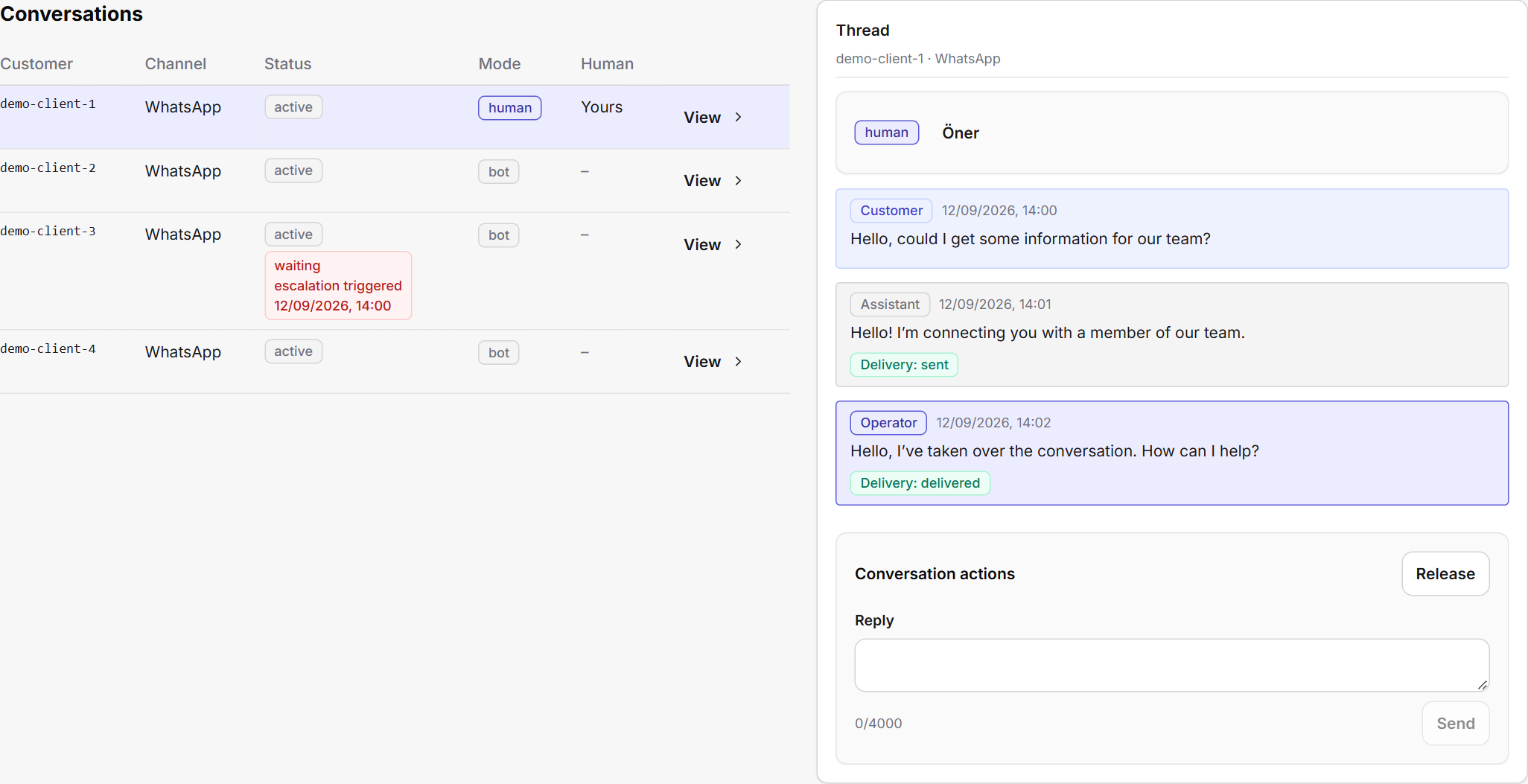
Messages, history and Öner in the same conversation. When human support is needed, your team continues with the context at hand.

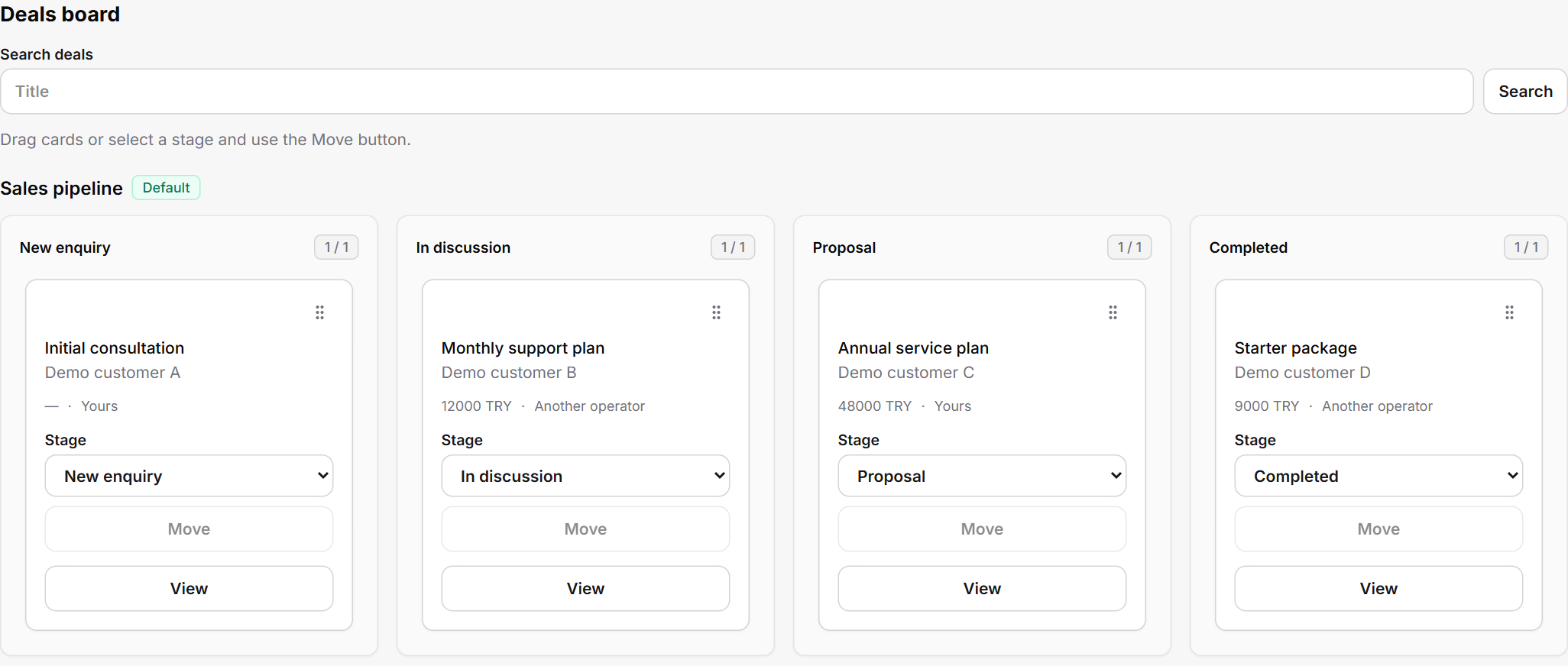
Follow opportunities through their stages. Keep the contact, conversation notes and current sales stage together.

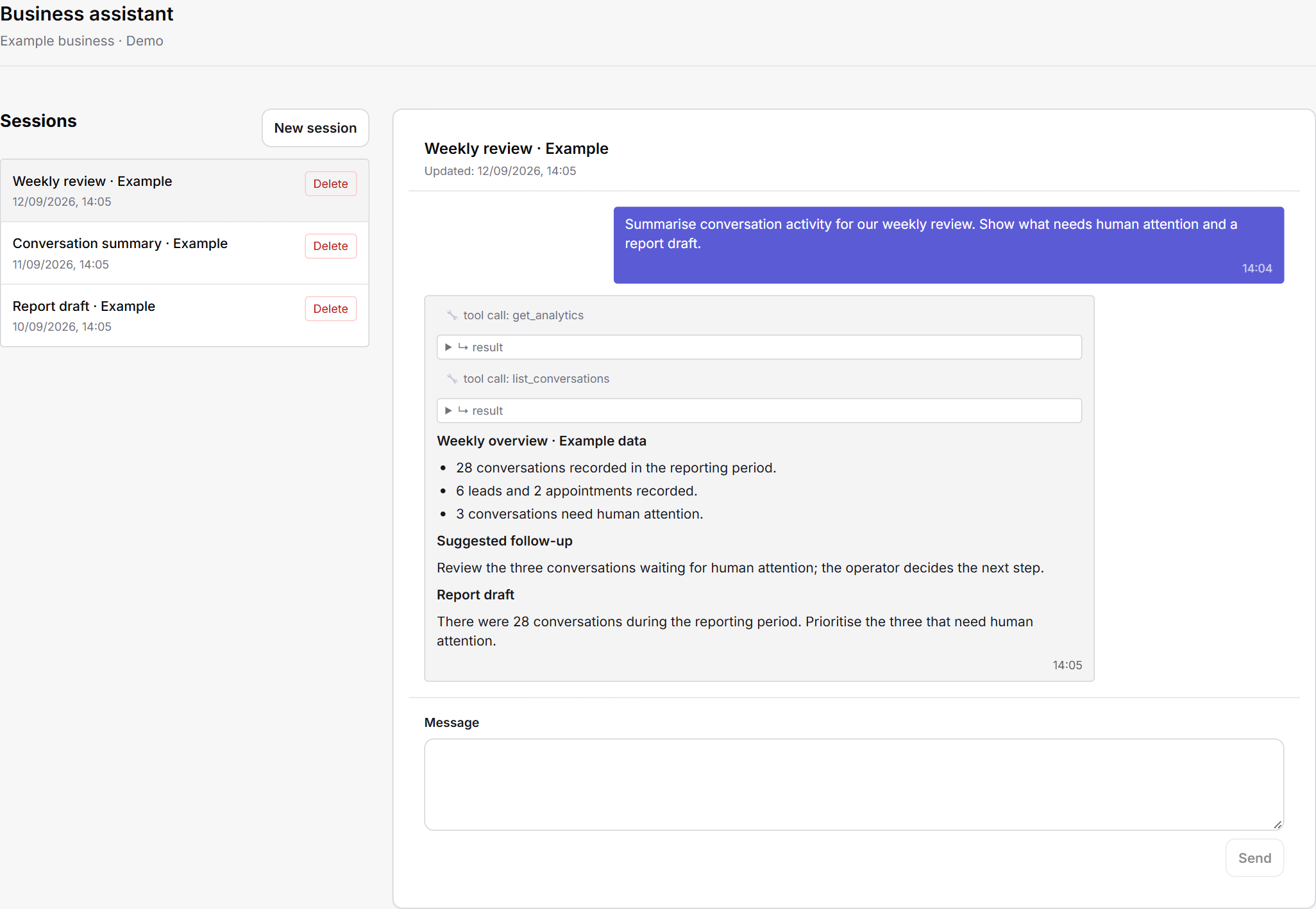
Ask your assistant to review conversations and create saved reports. Create or update records in your connected Notion spaces using natural language.

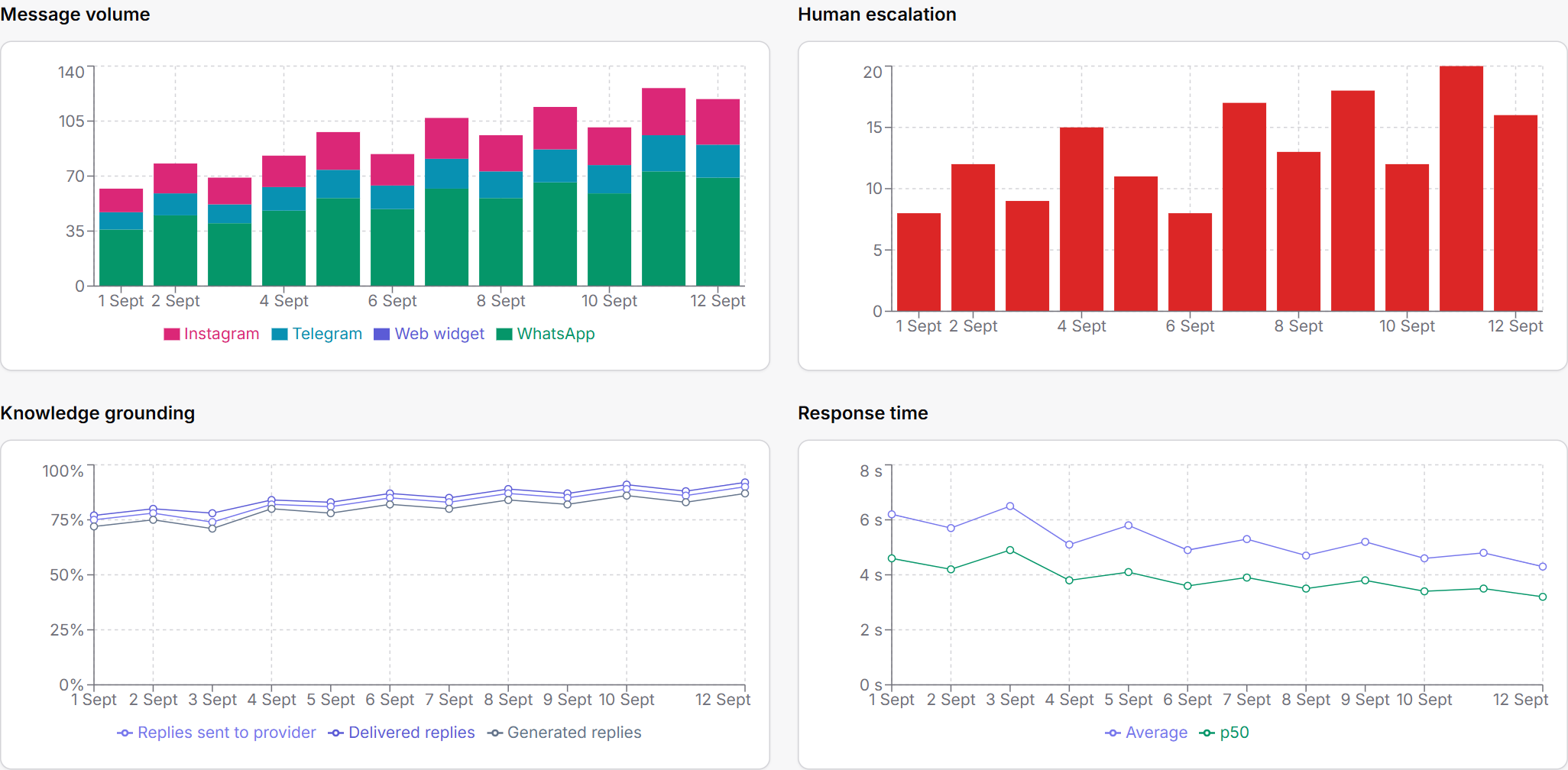
Review conversation volume, human handoffs and response times. Get a clearer view of your team’s work.

Create tasks and set an owner and due date. Follow open and completed work, search tasks and review their details. The new workspace is being prepared for release.
Demo Customer · Team of 8
Demo Customer · Meeting follow-up
Who is asking, when, and what they need all matter. Molvek Bot considers these parts of the conversation together.
Continues with the customer identity supplied by the channel and the conversation history, helping reduce repeated questions.
Considers the day and time together in appointment conversations. Carries a clear request into the record.
Takes time-zone and working-time context into account, keeping the conversation in step with your business day.
What Molvek Bot can do
From conversations and knowledge to sales and reporting. Open a topic to see the details.
Review conversations by channel and status. Follow a WhatsApp enquiry or a conversation that started on your website from the same panel.
Answer questions about your products, services and how you work using your business knowledge. Help clarify what the customer needs as the conversation develops.
Respond to messages in different languages. Keep your brand’s voice while making it easier for customers to express what they need.
Take over when a conversation needs an operator or a customer asks for human support. Read the previous messages and pick up where the conversation left off.
See signals for interested leads and conversations needing attention. Set your follow-up priorities and focus on the right conversations.
Track sent, delivered and read statuses for WhatsApp messages. See whether a message reached the customer within the conversation.
Capture contact details, customer interest and conversation notes in a lead record. Turn the first interaction into something your team can follow up.
View phone numbers, email addresses and notes alongside the timeline of linked conversations. Continue with context instead of searching for the last exchange.
Create multiple sales pipelines, name their stages and arrange them in order. Match the process to the way your business moves from enquiry to sale.
Review opportunities in a list or move them across a Kanban board. See your whole pipeline and the work at each stage.
Record the owner, value, currency, expected close date, last contact and next step. Keep the information needed for follow-up beside the opportunity.
Assign opportunities to teammates. Keep notes, stage changes and assignment history in the same record.
Add PDF, DOCX, CSV, TXT and Markdown files to your knowledge base. Use the documents you already have to support customer answers.
Add text directly and upload updated versions of your documents. Manage changes to your services and products in one place.
Define the assistant’s identity, tone and response guidelines. Keep customer communication aligned with the way your business speaks.
Track document usage and indicators of gaps in your knowledge base. Use these insights to guide content improvements.
Turn the agreed date, time and appointment details into a record. Bring the outcome of the conversation into your team’s workflow.
Add appointments to your business’s Google Calendar. Keep customer conversations and scheduled work connected.
Follow changes and cancellations for linked appointments. Reflect updated calendar details in the corresponding Molvek record.
Send appointment reminders over WhatsApp. Use message templates and quiet hours to organise communication before the meeting.
Filter audiences by sales stage, last contact, owner and opportunity value. Reach a relevant customer group instead of sending the same message to everyone.
Refresh your Meta templates and view their approval status, language and category. Choose the template that fits your campaign.
Fill in template variables and review the message. Preview the recipient list and see who is excluded and why.
Track communication permissions and opt-out history per contact. Manage permanent exclusions and review consent records before importing them from CSV.
Start, pause, resume or stop campaigns. Monitor their status as sending progresses.
Review campaign progress and recipient results. Distinguish sent, failed and uncertain outcomes to plan your next follow-up.
Ask natural-language questions about conversations and communication performance. Explore relevant exchanges and their details with the assistant.
Create saved reports from your work with the assistant. Return to your personal chat sessions and continue where you left off.
Read, create and update Notion pages and records with the business assistant. Bring information into the spaces where you manage everyday work.
Generate a conversation summary and a reply draft. Edit the draft, add your judgement and send it to the customer.
Track messages, leads, appointments and human handoffs together. Understand how your customer communication develops.
Review hourly traffic and message volume by channel. Plan your team’s time around when customers get in touch.
View average and median first-response times. Compare bot and human responses to assess your service workflow.
Report on open opportunities, their value and stage distribution. Review won and lost deals, conversion, time in the pipeline and upcoming close dates.
Automatically prepare daily, weekly and monthly business summaries. Revisit past reports in the panel and share them in Notion.
Track model usage and estimated costs for bot replies. Review usage trends alongside your business’s communication volume.
Assign conversations to operators and manage team roles. Follow the work each teammate is handling in the shared panel.
Keep track of conversations waiting for human support. Receive browser notifications about new activity.
Sync contacts, opportunities and sales stages with Notion in both directions. Monitor sync status in the panel and reduce the work of maintaining information in two places.
See the status of channels, knowledge, assistant settings and integrations. Manage your business workspace from one panel.
We start by discussing your business needs and scope. Together, we assess the channels and workflows you need and prepare a proposal that fits.
Yes. When human support is needed, your team can take over with the message history and the summary prepared by Öner.
Yes. You use your business’s own WhatsApp Business account. Channel setup, permissions and Meta requirements are reviewed together.
Tell us about your business, common questions and the work you want to follow up. We’ll define the scope and prepare your knowledge base, channels and way of working together.
Explore Molvek Bot for your business
Ask a question as one of your customers would. See Molvek’s live bot answer right here.
Type a question you would ask.
Molvek’s live bot answers using information about our own product.
Ask a follow-up and try the conversation for yourself.